1 - Preface
About digital signatures
What is a digital signature?
A digital signature is an encrypted electronic signature that can guarantee the origin of an electronic document, its integrity, and its authenticity. When you manually sign a document, you guarantee your agreement to the text content. A digital signature does the same thing and adds even more information. It guarantees signature authenticity by proving that you are the person who signed, it ensures document integrity, meaning that it has not been modified since the signature, and also confirms that the sustainability of the document, ensuring its validity for years to come.
Difference between a digital and an electronic signature
An electronic signature consists of blocks of information that identify you. A digital signature is a form of electronic signature that is more secure because it is encrypted and can be invisible. It protects many elements of your documents.
Support material for ConsignO
- This manual
- Videos tutorials
- Webinars
- Notarius’ Website Help section (FAQ, demos and guides, downloads and help)
- Customer and Support services that you can reach via
- Contact page
- Phone (1-855-505-7272 or 1-514-281-6533)
- Chat with us, at the right bottom side of the page.
How to install CertifiO Suite
CertifiO Suite for Windows includes ConsignO Desktop, Entrust ESP (EESP) and CertifiO Manager.
For macOS, only ConsignO Desktop is included.
EESP is incompatible with ARM-based processors
(ex.: certain Microsoft Surface models). More details here.
Technical Requirements
- Operating systems
- Windows 10 or Windows 11 (64-bit version) updated in the last 12 months.
- Last 3 macOS versions supported by Apple and updated in the last 12 months (Monterey, Ventura and Sonoma).
- It is possible that older OS versions are 100% compatible with our products and can therefore be used, but Notarius undertakes to support and, if necessary, apply fixes only for above versions listed.
- It is also possible that some delays (typically less than 1 month) be encountered before our products can all be updated to support a recently released OS version. We strongly suggest to contact Notarius before upgrading your OS to a recently released OS version.
- Administrative rights for the installation;
- If you do not have admin privileges on your computer, you need to ask your IT department to do the installation.
- The firewall and antivirus software must authorize the necessary outbound ports, as described in the article Firewall configuration, or by creating a Proxy configuration specific to your network topology
- Internet connection;
- It is possible to use ConsignO Desktop and CertifiO Manager in a limited fashion, without a connection to our servers, for a maximum of 30 days.
Installation
- Download and execute CertifiO Suite;
- Select all components to be installed. ConsignO Desktop, Entrust ESP and CertifiO Manager will be installed or updated;
- For enterprise deployments, consult the article on the silent installation of the CertifiO Suite.
Notes related to CertifiO Manager
- For Mac users, CertifiO Manager is no longer included in the CertifiO Suite and must be downloaded from the CertifiO Manager section available here: Download
- CertifiO Manager is required to activate your digital signature and access your online account: My Account.
- For more details on CertifiO Manager: What is CertifiO Manager?
2 - Presentation of the ConsignO Desktop Interface
About ConsignO Desktop
ConsignO Desktop is specifically designed to digitally sign PDF documents with ease and speed, one at a time or several at the once, or add your signature to documents signed by others, in just a few clicks. You can also convert a batch of PDF documents in PDF/A, apply templates to your documents or quickly apply stamps in several places of a document.
Digitally signing a document enables the recipient to view the sender’s digital signature certificate. This feature links the signer to the document in a way that is irrefutable and confirms the signer’s identity and professional status. It is applying one’s official signature, digitally, on a document.
ConsignO, makes it possible to digitally sign a document and send it to a client via email while preserving its authenticity.
ConsignO Desktop main window
ConsignO’s main window is laid out with different sections and functions.
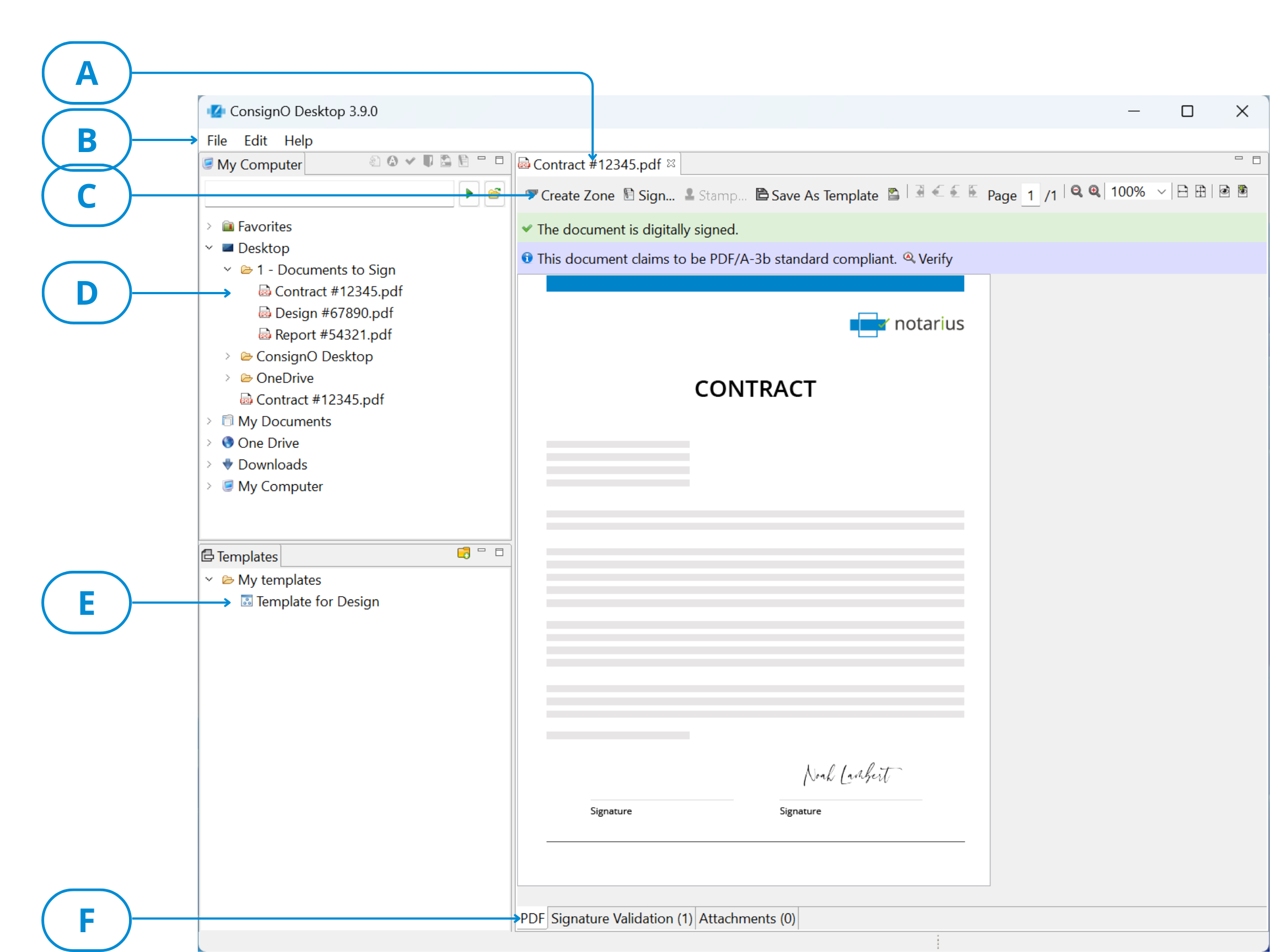
| A | Opened Document Tab | This section displays a tab per open document. It allows you to switch from one open document to the other by selecting the appropriate tab. You can close an open document by right-clicking on a tab and selecting Close or by clicking the “X” on the document’s tab. Right-clicking gives you three options: close the selected document, close all documents but the selected one, or close all documents. |
| B | Main menu | This section contains the ConsignO window’s main functions:
|
| C | Main view tool bar | This section shows buttons that give access to document functionalities. It gives quick access to stamping and signature appearance functions. It also allows to navigate through the document pages and to modify the view (zoom) of the document. These buttons apply to the active document. |
| D | My Computer view | This section is a tree view of your computer file structure, as you would see it in a Windows explorer. There is also a toolbar available in this view. Small icons give access to reveal functions (PDF/A, signed documents and portfolios). You can also apply a template and start the signing process from that toolbar. These functions will apply to the selected document or folder. |
| E | Templates view | This section is a tree view of the templates documents. You can apply the template selected in this view by dragging and dropping it onto the open document in the document view. |
| F | Signature Validation tab | This section has two tabs that allow you to toggle the view between the document and the digital signature information of the document. These tabs apply to the selected document. |
Note: You can minimize either the Templates or My Computer views and it will appear as a small icon on the left side of the main window. You can restore the regular view by clicking on the minimized icon.
Right click shortcuts in main window
A right-click in the My Computer view or the Templates view brings a pop-up window allowing shortcuts to different ConsignO functions: Right-clicking from the My Computer view allows the following functions:
- Open
- Convert to PDF/A format
- Verify PDF/A compliance
- Apply template
- Stamp
- Sign
- Combined Actions
- Reveal PDF/A documents
- Reveal signed documents
- Create a portfolio
- Merge documents
- Send to ConsignO Cloud
- Email PDF
- Print with Adobe Reader
- Print with ConsignO Desktop
- Cut/Copy/Paste/Delete
- Refresh
Right-clicking from the Templates view allows the following functions:
- Create Folder
- Rename
- Delete
- Refresh
All functions are detailed in this User guide.
Open, close and save documents
You can manage your documents within the application. Many possibilities are available.
To open a document:
- Four possibilities are available. You can either:
- From the File menu, select Open. A pop-up window allows you to browse your computer to select your file. You can select multiple files at once.
- From the My Computer view, select one or more documents, then right-click and select Open.
- From the My Computer view, select one document and double-click. Only one document at a time can be opened this way.
- From your computer’s file explorer, drag a document to ConsignO’s main view window to open it.
To close a document:
- Many possibilities are available. You can either:
- From the open document tab, click on the cross directly on the selected document tab.
- From the open document tab, right-click and select either Close to close the selected document, Close others to close all but the selected document or Close all.
- From the File menu, select Close or Close all.
To save a document:
- From the File menu, select Save to save the selected document, Save as to give it another name or Save all to save all opened documents.
ConsignO Desktop shortcuts accessible directly from the desktop
To speed up and simplify common tasks, you can use some of ConsignO’s functions directly from your desktop. In just two mouse clicks, you can select your files from your Windows file browser and execute a function of ConsignO, such as converting to PDF/A or signing. The file selection is also memorized, allowing you to chain many functions without having to reselect your files. You can for example, convert your files to the PDF/A format, apply a template, stamp and then sign your file, using only a few mouse clicks.
To access ConsignO from the desktop:
- Select the document you want to use with ConsignO from your computer’s file explorer.
- Right-click and select Send to.

- Select which function you want to access from the ones available in the list.
3 - Preferences
About Preferences
What you should know
Preferences allow you to predefine formats, behaviours and file locations that are often used, like Signature Appearances and Dates formats. It promotes a standard usage of the software among users and prevents from having to recreate the same formats every time they are used.
Before you begin
- Install ConsignO.
To open the Preferences window
- Open ConsignO
- From the Edit menu, click Preferences.
The Preferences window appears.

The left panel shows the type of preferences available. The right panel allows to edit the selected preferences. In the top right of the window, the navigation arrows allow you to navigate between types of preferences, while the drop down arrows allows you to modify the relative width of the panels.
- In the Preferences window, select the type of preferences you want to edit:
- Click Apply to effect the changes. You can always click Restore defaults to go back to the software factory values.
- Click Apply and Close
Your preferences are now set.
General Preferences
What you should know
General preferences allow you to specify if you want to have your previously opened documents reopened automatically when you launch ConsignO.
To modify the General Preferences:
- Open the Preferences window.
- Select General in the left panel.
- In the right panel:
- Select your default signature certificate from the drop-down menu. These certificates are provided by your organization
- Select how you want your files saved by clicking on the chosen option. You can overwrite the initial file; you can rename the file or create a new file in a different destination folder that you can specify by clicking Browse.
- Check the box Memorize my open documents and open them when I next launch ConsignO if you want this option enabled.
- Click Apply or Apply and Close in the Preferences window.
Your General preferences are now configured. You can always go back to factory settings by clicking Restore Defaults.
Signature Appearance
What you should know
From the Signature Appearance preferences page, you can manage your different Signature Appearances. You can delete the ones you do not use, modify them or you can create new ones by opening the Signature Appearance Wizard.
To modify the Signature Appearance preferences:
- Open the Preferences window.
- Select Signature Appearances in the left panel.

-
- Select a Signature Appearance and click Modify or create a complete new one by clicking Add.
- With the Signature Appearance Wizard now opened, create your Signature Appearance.
- If you want to remove a Signature Appearance from the list, select it and click Delete.
- (Optional) Check the Hide the invitation to create a Signature Appearance at application startup when it detects its absence box to remove the missing Signature Appearance message.
- Click Apply or Apply and Close in the Preferences window.
You now have your list of available Signature Appearances.
Stamping
What you should know
Stamping preferences allows you to specify whether or not you want to have the warning about stamping being different than signing displayed after every time you stamp a document.
To modify the Stamping Preferences:
- Open the Preferences window.
- Select Stamping in the left panel.
- In the right panel, check the box Do not display the warning during the stamping process if you want to disable the warning.
- Click Apply or Apply and Close in the Preferences window. Your Stamping preferences are now configured. You can also restore the installation preferences by clicking Restore Defaults.
Security
What you should know
SHA (Secure Hashing Algorithm) is a cryptographic hash, which is like a signature for a text or datafile. Hashes are convenient for situations where computers may want to identify, compare, or otherwise run calculations against files and strings of data. It is easier for the computer to first compute a hash and then compare the values than it would be to compare the original files.
SHA 1 and SHA 256 are two different algorithms, SHA 256 being more recent and more secure than its predecessor. This is the recommended option.
To modify the Security Preferences:
- Open the Preferences window.
- Select Security in the left panel.
- In the right panel, use the drop down to select which hashing algorithm to use with ConsignO.
- Click Apply or Apply and Close.
Your hashing preferences are now configured.
Date format
What you should know
It is possible to set the date format that will appear on your signature appearance at the moment of digitally signing, but you can also set a format for all Signature Appearances that have this option enabled. A list of possible formats is provided but it is also possible to add personalized date formats. (See Signature Appearances)
To modify the Date format preference
- Open the Preferences window.
- Select Date formats in the left panel.
- In the right panel, select the date format that you want to use if it is different than the default format. If none is exactly how you want it, select the closest.
- Click Modify. You can also create a complete new one by clicking Add.
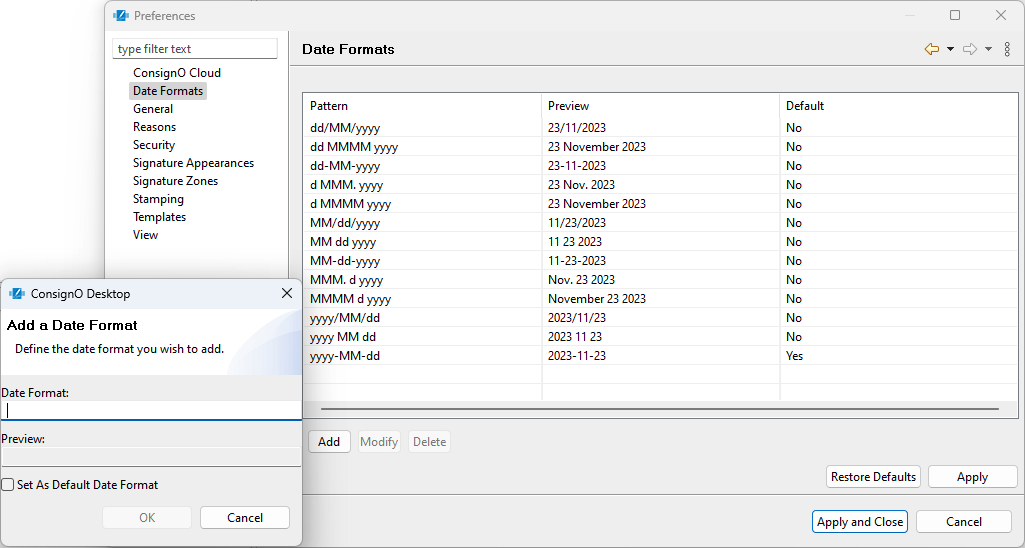
- In the Modify/Create a date format window, enter your format using the following standard character sequences:
- dd: Numeric value (2 numbers) used to identify a specific day, i.e., 02-11-2015.
- d: Numeric value (1 number) used to identify a specific day, i.e., 2-11-2015. However, any number over 10 could still be used, i.e., 23-11-2015.
- MM: Numeric value to identify the month, i.e., 02-02-2015.
- MMM.: Abbreviation followed by a period to identify a specific month, i.e., 2 Sept. 2015.
- MMMMM: To identify a specific month spelled out in full, i.e., 2 September 2015.
- yyyy: Numeric value used to identify the year, i.e. 2 Sept. 2015.
The character sequences can be separated by different symbols. A preview example is provided below the entry field. An error message appears if the format is invalid.
- Check the Set as Default date format box to apply this new format by default to all new signatures.
- Click OK.
- (Optional) You can also select any unwanted format and click Delete to remove it from the list.
- Click Apply or Apply and Close in the Preferences window.
Your Date formats preferences are now configured.
Templates
What you should know
Templates preferences allow you to specify the file location where you want your templates stored. The templates are saved as XML files that can be shared with other users by copying these XML files in the defined location.
To modify the Templates Preferences:
- Open the Preferences window.
- Select Templates in the left panel.
- In the right panel, click Browse to select the template files location.
- Click Apply or Apply and Close in the Preferences window.
Your Templates preferences are now configured.
Reasons
What you should know
When you apply a digital signature to a document, you can specify a reason to provide more details about what was done to the document. For example, you may want to specify that the document was revised, that it was approved or that it is complete. The reason will be visible in the Signature Appearance if that option is enabled.
To modify the Reasons preferences:
- Open the Preferences window.
- Select Reasons in the left panel.

- You can select a reason and click Modify or you can create a complete new one by clicking Add.
- In the Modify/Add a reason window, type your reason in the entry field.
- (Optional) Check the Set as Default reason box to apply this reason by default to a new signature.
- Click OK.
- Click Apply or Apply and Close in the Preferences window.
You can now see the reason associated to a signed document with the digital certificate information of the digital signature.
Signature Zones
What you should know
You can predefine Signature Zones sizes to standardize them across document types. The minimum size possible is 0.1 inch by 0.1 inch.
To modify the Signature Zones preferences:
- Open the Preferences window.
- Select Signature Zones in the left panel.

The right panel contains a list of predefined Signature Zone sizes. You can use multiple sizes for different types of Signature Appearances.
- Select Signature Zones in the left panel.
- Select a Zone that you want to use and click Modify to personalize it. You can also create a complete new one by clicking Add.
- In the Modify/Add a zone type window, configure the following:
- Zone Type: Enter a name that will identify the type of Signature that can fit in this zone, for example a seal or initials.
- Width: Width in inches of the Signature Zone
- Height: Height in inches of the Signature Zone
- Set as default Zone Type: Check to set this Signature Zone size the default one.
- Click OK.
- (Optional) Select and Delete unused Signature Zone sizes.
- (Optional) Select Do not display a warning when the document about to be digitally signed does not contain any signature zone to remove the warning.
- Click Apply or Apply and Close in the Preferences window.
You now have a predefined Signature Zone sizes available when signing a document.
View
What you should know
Each time you change the placement or the size of a visual element, ConsignO Desktop persists automatically its new layout. By clicking the Restore Defaults button, all parts of ConsignO Desktop, like windows and tabs, will get back to their original state. This can help restore a window that is no longer shown.
To restore the default view options:
- Open the Preferences window.
- Select View in the left panel.
- Click Restore Defaults to go back to factory defaults
- Click Apply and Close.
4 - Signature and Stamping of Documents
Stamping a document
What you should know
There is an important difference between applying stamps in a document and applying a signature. Every time you apply a stamp, you insert an image (your signature appearance) which modifies the content of your document without adding the protection a digital signature would do. For this reason, you cannot stamp a digitally signed document as the stamp would compromise the integrity of the previous signature.
Stamping is often used to initial each page of a multi-page document. Although you can only apply stamps one document at the time, you can stamp multiple pages on that document at once.
If multiple signers need to stamp, be sure that everybody stamp BEFORE any digital signature is applied. If a digital signature is applied, the stamp feature will be greyed out.
You must digitally sign your document after stamping.
Before you begin
- Make sure you have your valid digital certificate
- Convert the document to sign into the PDF/A format (optional but recommended)
- Create your Signature appearance.
- Create your Signature zone.
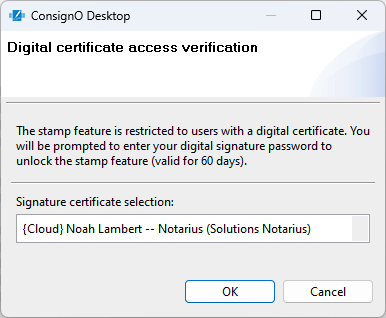
If this is your first time stamping a document and/or you have not signed a document in the last 60 days, you will be required to:
- Windows users: Authenticate yourself in order to unlock the feature
- macOS: Sign a document in order to unlock the feature
To Stamp a document
- Open the document in ConsignO
- Click the Stamp button in the main view or right-click in the signature zone and select Stamp.
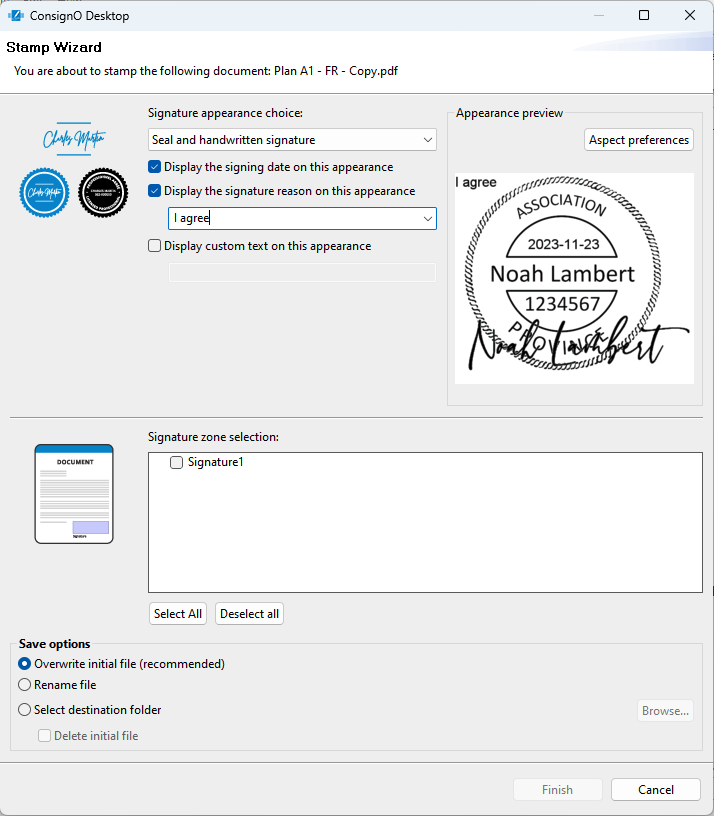
- In the Stamp wizard, make the following selections:
- Select the Signature Appearance that you want to see on the document. It will appear in the Appearance Preview section of the wizard.
- Check if you want to display the date on the signature appearance. It will appear in the Appearance Preview section of the wizard
- Check if you want to display the signature reason on the signature appearance. You can select the reason from the dropdown list. It will appear in the Appearance Preview section of the wizard.
- Check if you want to display custom text in the signature appearance. Write the text directly in the capture field. It will appear in the Appearance Preview section of the wizard.
- From the Signature Zone selection box, check the selected signature zone from the list. to choose the stamp location. You can select multiple locations (on multiple pages) at a time.
- In the Save options section, select what you want to do with the stamped file:
- Overwrite initial file
- Rename the file
- Select a new destination folder
- Select a new folder and delete the initial file
- Click Finish
You now have a stamped document ready to be signed or seen as such.
Signing a document
Please note that this solution only applies to subscribers of a CertifiO Desktop digital signature (hosted on .epf file). If you are looking for a solution for a CertifiO Cloud digital signature (hosted on Notarius' secure cloud), click on this page.
What you should know
Signing a document embeds the information certified by your digital signature into the document, identifying you as the person who approves or takes responsibility for its content.
Before you begin
- Make sure you have your valid digital certificate.
- If you have a CertifiO Cloud Digital Signature make sure you are connected to my Notarius account in order to use it.
- Convert the document to sign into the PDF/A format (optional but recommended)
- Select between a visible or invisible signature.
- Create your Signature Appearance if a visible signature is selected.
- Create your Signature Zone if a visible signature is selected.
To sign a document
- Open a document in ConsignO
- Click the Sign button in the main view or right-click in the signature zone and select Sign, the signature wizard will appear.
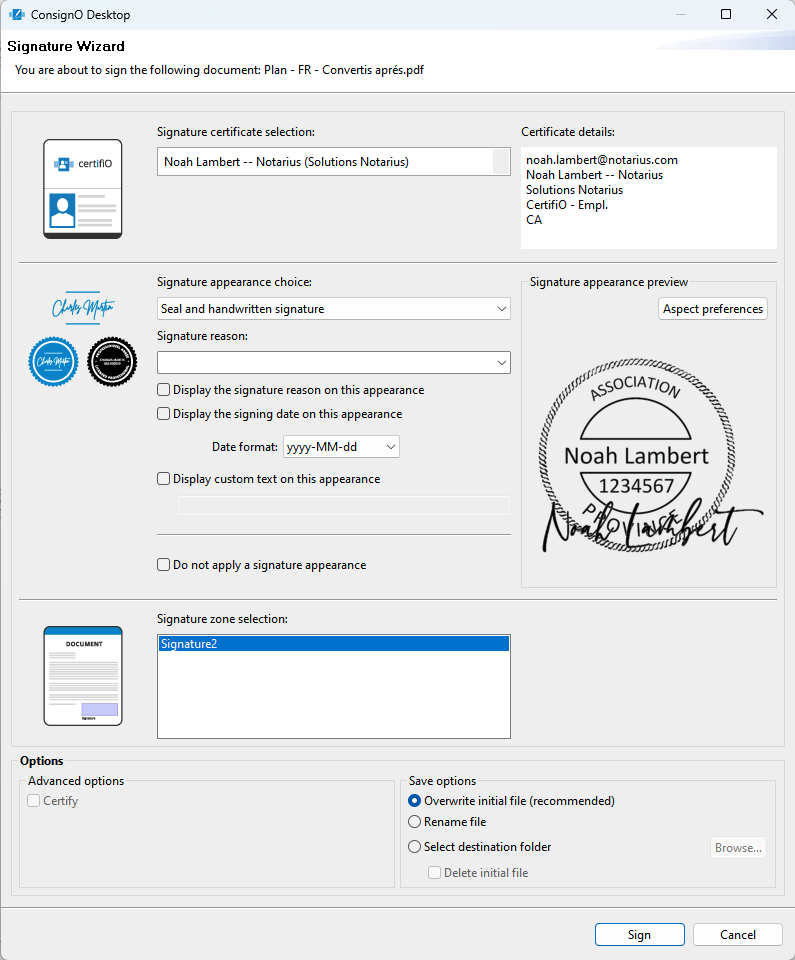
- In the Signature wizard, make the following selections:
- Select your digital certificate from the Signature Certificate selection drop down. If you have a CertifiO Cloud signature, it should be listed. Otherwise, make sure you are connected to my Notarius Account.
- Select the Signature appearance from the list. This list can be modified in the Preferences . A preview of the selected appearance will appear.
- Select the signature Reason from the list or type directly in the Signature Reason field.The list can be modified in the Preferences
- Select if you want to Display the signature reason, the date and/or custom text on the signature. Your selection(s) will appear in the appearance preview.
- You can select a signature date format on your aspect which may be different from the one selected in your preferences.
- You can also select not to apply a signature appearance. In this case, you have an invisible signature. See Visible vs invisible signatures to understand the difference.
- In the Save options section, select what you want to do with the signed file:
- Overwrite initial file
- Rename the file
- Select a new destination folder
- To certify the document, select Certify in the Advanced Options and select the restrictions to apply:
- Allow signing in existing zones
- Allow no further modifications
WARNING! Certifying a document creates many limitations. You need to know the entire document life cycle for all parties involved throughout the life of the document (which is often decades), and be confident that no additional signature will be needed by one party throughout this period.
- Click Sign
- With CertifiO Desktop digital signature, you will be prompted to enter the password associated to your digital certificate (.epf)
- With CertifiO Cloud digital signature, you will need to confirm your second authentication factor associated with your Notarius account (Details)
You now have a signed or a certified document for your archives.
Visible vs invisible signature
Applying a digital signature adds metadata on a document without modifying its content (thus without impacting its integrity). This is how multiple signatures can be applied to a document while preserving the document’s integrity.
A visible signature includes a metadata that holds a visible marker (signature appearance) when viewing the document, showing that it has been signed.
An invisible signature omits this visible marker.
Both types of signature ensure the integrity of the document. The digital certificate information can be seen with both types when validating a signature. A visible signature, however, can appear on physically printed documents (this can be useful if printed copies of documents are also used or archived).
You can choose to use visible or invisible signatures according to your company policy.
Signature zones
What you should know
Signature Zones are locations on a page where the visible signature or stamp can be applied. It has dimensions (height and width) and a position on the page. It is visible on a document opened in ConsignO as a blue rectangle. The zone identifier or name is written inside the rectangle. You can define the signature zone size beforehand in the Preferences menu or you can draw it directly on the page (custom format).
To create a signature zone:
- Open a document in ConsignO.
- Click the Create Zone button in the main window. The pointer takes the shape of a cross.
- Click on the document where you want the first corner of the signature zone and drag the mouse until the rectangle has the desired size. You may also click without dragging the mouse to obtain a zone having the default dimensions.
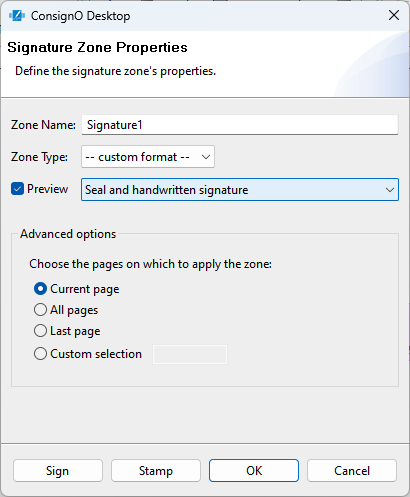
- In the Signature zone properties pop-up:
- Type a zone name to identify it.
- Select the zone type:
- If you select custom format, the signature zone will remain as you have drawn it.
- If you select one of the predefined formats on the list, it will resize itself according to the selected format size.
- Preview:
- If you check this box, you will need to choose your signature appearance from the drop-down menu
- Then, once you click OK, you will be able to see what your appearance looks like on the document
- In the Advanced Options section, select on which page or pages you want the zone to appear.
- You can sign or stamp directly by clicking the appropriate button or you can click OK to sign it or stamp it later.
- You can resize and move the signature zone by clicking on the blue rectangle. The zone becomes red and you can move it by sliding it in place or you can resize it by stretching any corner.
You now have a Signature Zone ready to receive a Signature Appearance.
Validate a signature
What you should know
A digitally signed PDF will have the signer’s digital certificate embedded within. It is possible to view this information within ConsignO, even if the signature is invisible. You can also view which documents are signed in the My Computer view by revealing the signed documents.
To reveal signed documents:
- From the My Computer view, select the folder in which you want to see if there are signed documents.
- Either right-click or use the Edit menu and select Reveal signed documents. You can also use the Reveal signed documents icon
 in the toolbar.
 - A green check sign
 will appear beside every signed document in the folder.
To validate a signature:
- Open a document in ConsignO
When a document is already signed, a blue band appears at the top of the document indicating that the signature is valid.
- Click on the Signature validation tab at the bottom of the page
You can now see who has signed the document, the digital certificate information associated to his or her digital signature, along with a detailed chain-of-trust analysis to attest the authenticity of the document.
Signature appearance creation wizard
What you should know
A Signature Appearance is a visual representation of what will appear on your document when you stamp it or sign it with a visual signature. It is usually an image of your written signature or your seal, but it can be any image you want to display when signing a document. The Signature Appearance becomes the visible part of a visible signature.
It is strongly recommended to us a transparent signature appearance; ConsignO includes a signature appearance wizard to facilitate the process. The background, represented by a grey and white checker, will not overwrite what is on the document. It is possible to remove transparency and have a white background that covers what is underneath. See the following examples:


Before you begin
- You need an image (JPEG, GIF, PNG, bmp, scanned pdf of the template model) to use for your Signature Appearance. You can scan your written signature, scan an image of your seal, the company logo, or use any image you want to appear on the documents. You can also download a model from Notarius to help you (see step 2i) below).
To create a Signature Appearance
- Open the Signature Appearance Creation Wizard from the Preferences menu or by using the menu Edit > Signature Appearance Wizard.
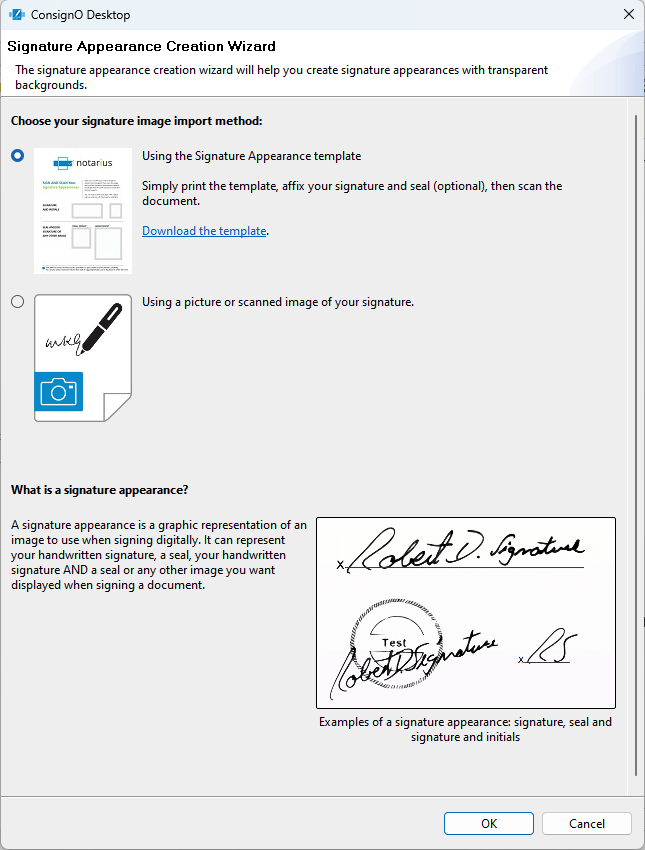
- Select your import method. You can either:
- Use the Signature Appearance template by clicking Download Template.
- Once the template is downloaded, print it
- Modify the printed template with your signature, seal or initials according to your needs
- Scan the modified template to get your image
- Use a picture or scanned image of your signature
- Use the Signature Appearance template by clicking Download Template.
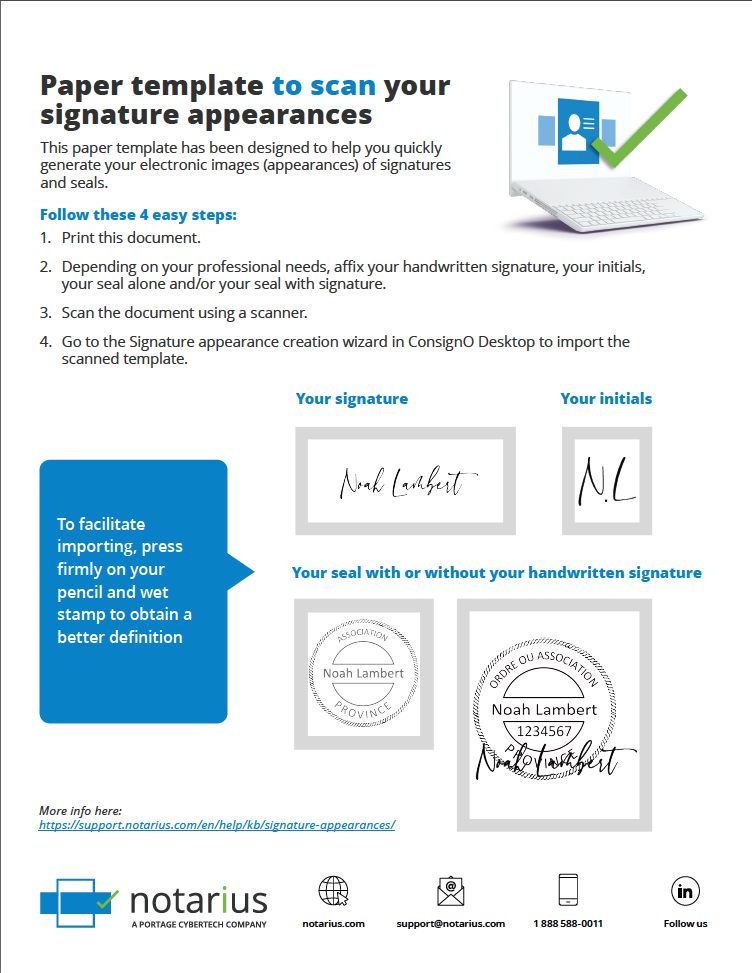
- Click OK.
- Open the image file that you want to use for your signature.
- If you selected to import from the downloaded template, the wizard automatically crops the image to get the different regions that represent the signatures, seal and initials.
- Select the ones you want to use and click Next.
- For each selected image, follow steps 6 c) to 6 h) below.
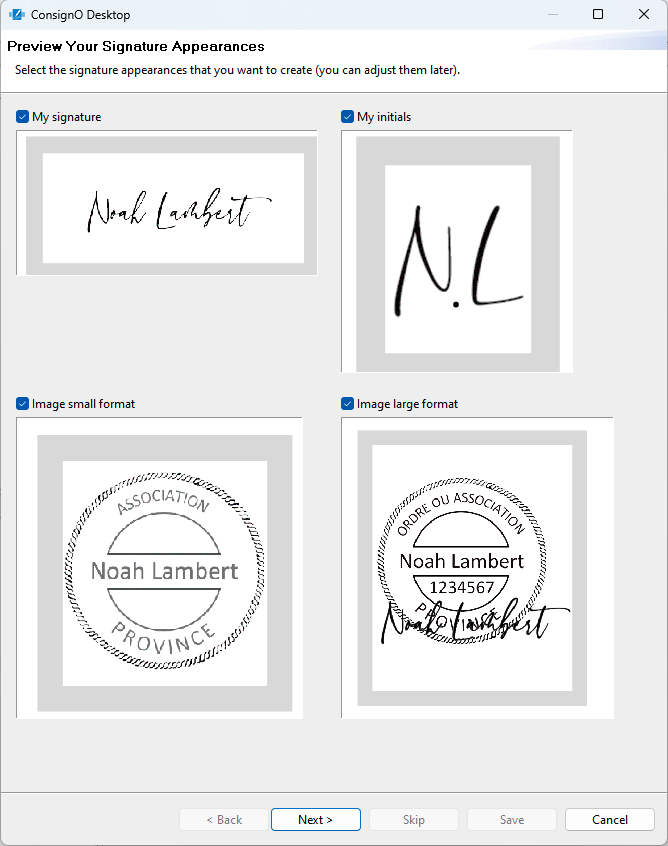
- If you selected to import from an image without using the template,
- Crop the image according to your need and click OK.
- Click Next to continue or Skip to keep the image as is.
- The wizard proposes four images with different transparency. The transparent parts are shown with a grey and white checker. Select the one that you want to use and click Next.
- Enter a name for the signature.
- Select a rotation for the image if necessary.
- Select Display the signing date on this appearance if you want the date to appear on the signature.
- Click Modify the position and the date format to place the date exactly where you want it to appear on the image, with the font, size and style you want.
- Select Display the signature reason on this appearance if you want a reason to appear on the signature.
- Click Modify the position and format of the reason to place the reason exactly where you want it to appear on the image, with the font, size and style you want.
- Click Save to complete the Signature Appearance creation.
- On the status window, select Set as default if you want that Signature Appearance to become the default one.
- Click OK to close the window.
You can now use the new Signature Appearance to visibly sign your documents.
Digitally sign with CertifiO Cloud from ConsignO Desktop
Prerequisite
- Subscribtion to CertifiO Cloud
- ConsignO Desktop 3.9.0 or later version
Connection to your Notarius account
Connecting to the Notarius account via ConsignO Desktop is only intended to access your CertifiO Cloud digital signature. If you want to access your Notarius account please click here.
Using CertifiO Cloud with ConsignO Desktop requires being connected to My Notarius Account to use your digital signature
- Click on the Edit menu
- Select My Notarus Account
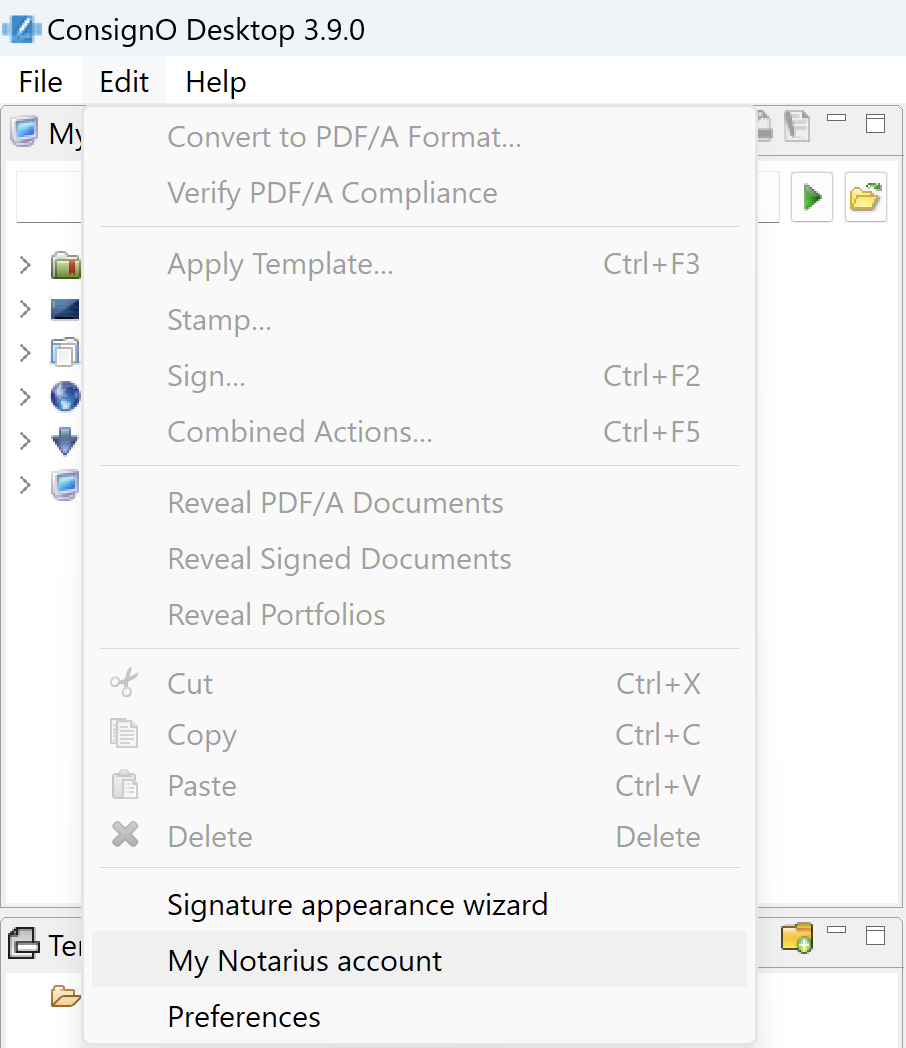
- Click on Login (You will be redirected to your browser to connect to your Notarius account)
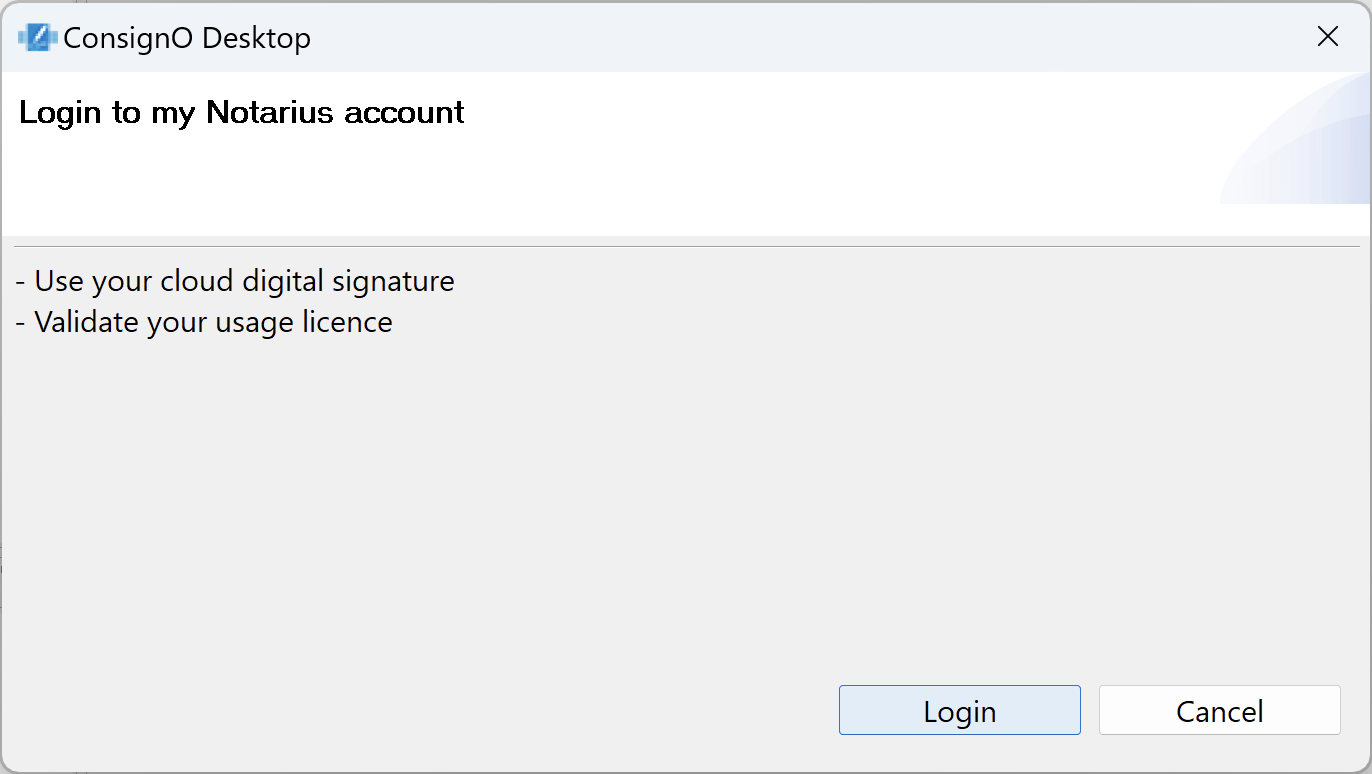
- Enter email and password of your Notarius account
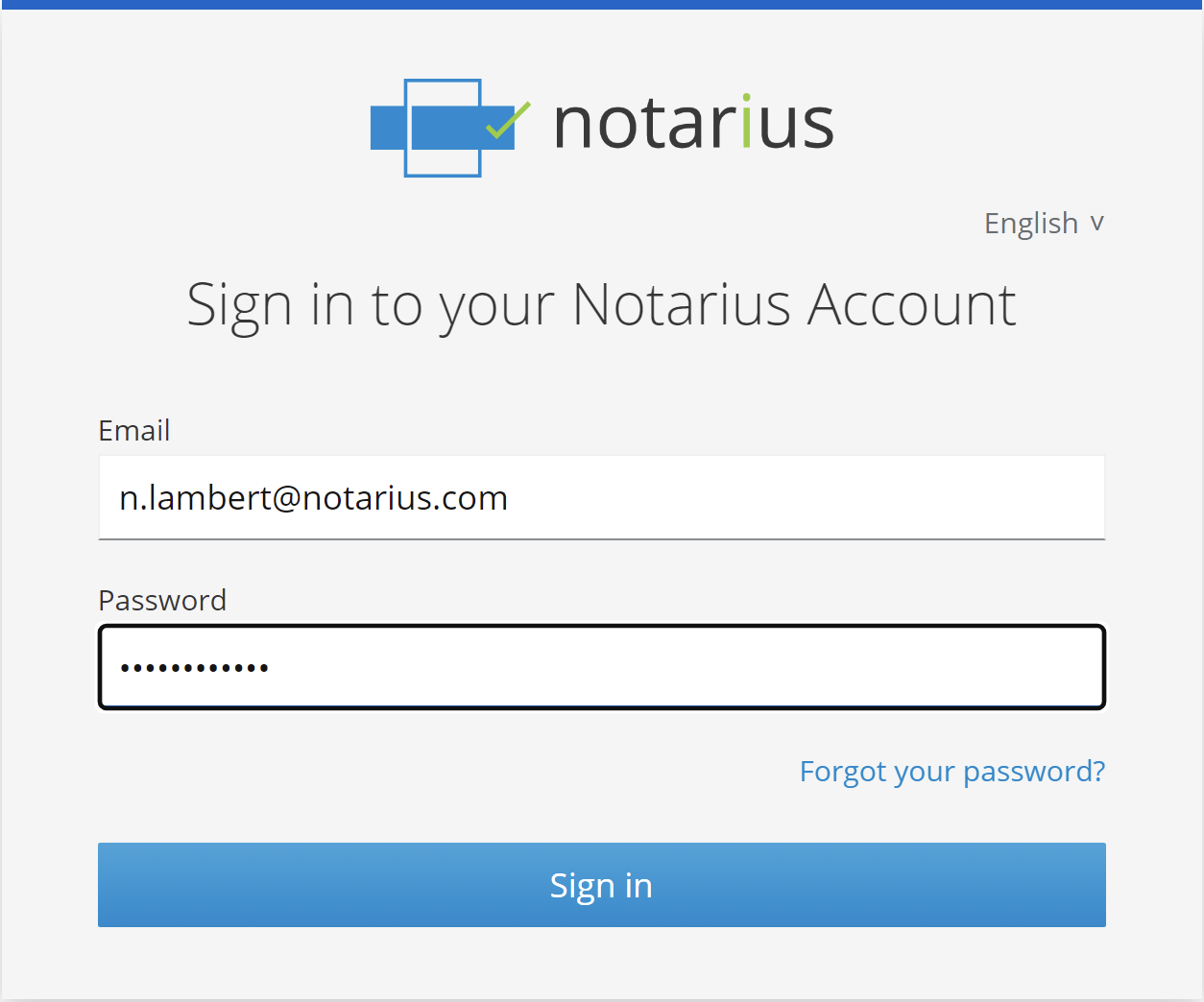
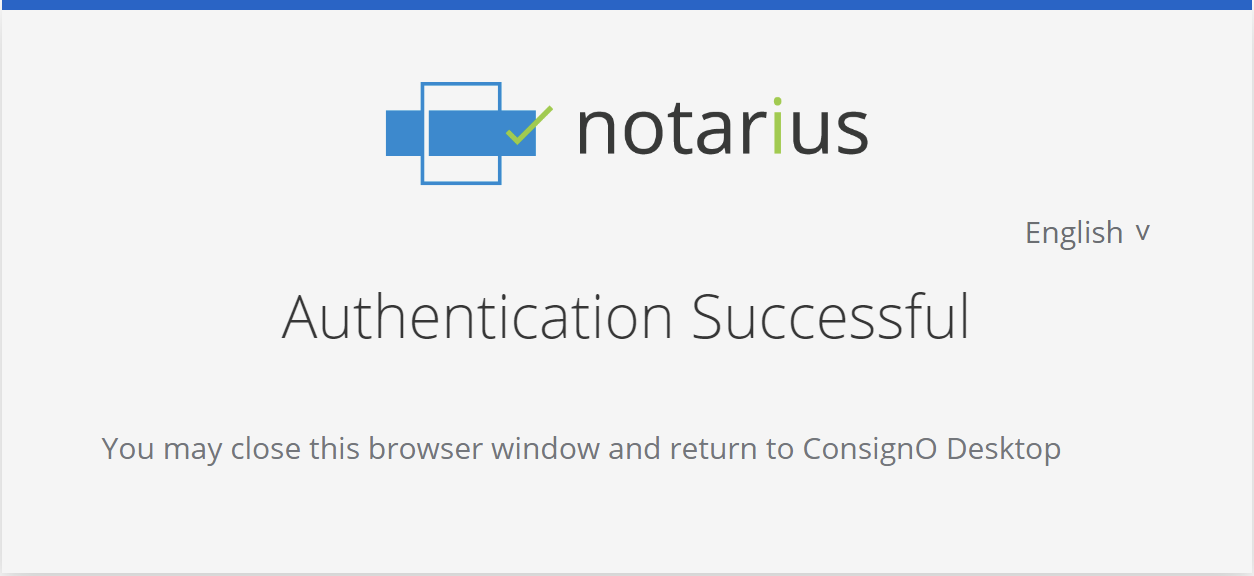
- After your authentication, you will then see the following window. You can close this window and return to ConsignO Desktop
- You are now ready to use your CertifiO Cloud digital signature.
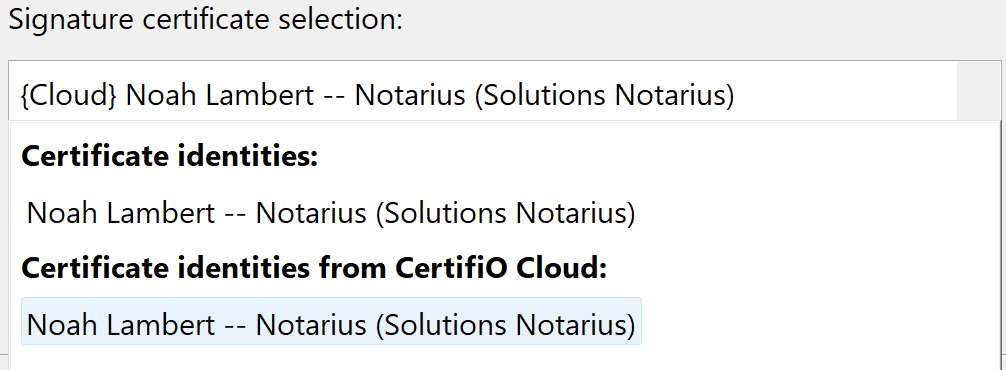
If you have multiple digital signatures available in your Signature Assistant, be sure to select the desired digital signature. The CertifiO Cloud digital signature can be found in the Certificate Identies from CertifiO Cloud section.
Confirmation of the second authentication factor when signing
Using the CertifiO Cloud digital signature requires entering a second authentication factor. This authentication factor is normally a code sent to the mobile associated with your account that you must enter in the window below:
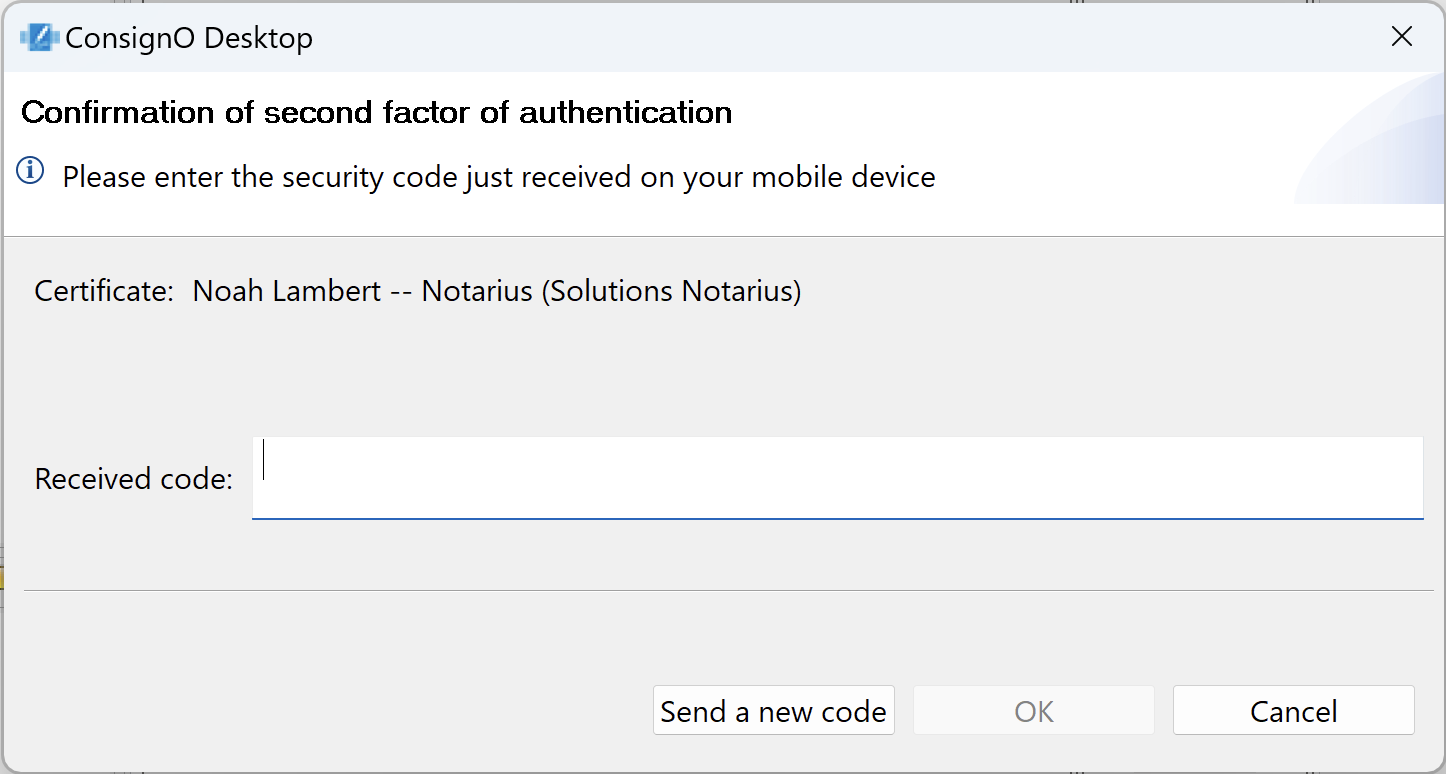
Once the code is confirmed, the signing session will typically allow you to sign around ten times before requesting new authentication.
You can batch sign more than 10 documents at a time. However, you will need to enter a second authentication factor for each batch of 10 documents.
5 - PDF/A
Working with PDF/A
What you should know
Learn more about the PDF/A format : Click here.
To convert a PDF document to PDF/A format from ConsignO Desktop
Note that you can also convert a document to PDF/A directly from Windows and its file explorer: More information
- Select one or more documents from the section My Computer
- Right-click on the selection or click on the Edit menu
- Select Convert to PDF/A format
- A new window will pop-up with some options:
- If you selected more than one file
- Click Next, if your selection is correct
- Cancel to select again
- Select from the drop-down between the PDF/A–1b, PDF/A-2b or PDF/A-3b (More information on the different versions)
- Then select what you want to do with the converted file:
- Overwrite initial file
- Rename the file
- Select a new destination folder
- Click Finish and a progress window will pop up to shows the conversion progress and status
- If you selected more than one file
- Click OK on the status window.
Your file is now converted to the PDF/A version selected.
To verify PDF/A compliance
- Select one or more documents from the section My Computer
- Right-click on the selection or click on the Edit menu
- Select Verify PDF/A compliance.
The status window displays the verification result.
To reveal PDF/A documents
- Select one or more documents from the section My Computer
- You can:
- Right-click on the selection or click on the Edit menu
- Select Reveal PDF/A documents.
- Click on the icon
 from the section My Computer
The icon appears beside the PDF/A documents among those selected.

Note that no compliance validation is performed with the reveal function; it simply looks up the PDF/A claim metadata in the document.
To add an attachment to a PDF/A
- Click on the Attachments tab situated at the bottom of the document pane

- You can then select any type of file you want to add
A convenient option of the PDF document format is the ability to attach files of any format, much like email attachments. This option does not limit the properties of the PDF document. In particular, the PDF document with attachments can :
- Be converted to PDF/A format (PDF/A-3b format allows attachments. See: Questions/Answers : The PDF/A Format)
- Be digitally signed, which guarantees the integrity of the document and the attached files, since the digital signature covers the PDF document and its attachments.
Thus, if a document cannot be converted to PDF/A format or its format is not practical for digital signature, you can, with ConsignO Desktop, attach it to a PDF document that can be converted to PDF/A-3b format and digitally signed to guarantee the integrity of the attachments.
6 - Templates
Creating templates
What you should know
In ConsignO, a model helps to avoid the repetition of preparing the same type of documents. Each model contains a Signature Zone and its location on the document. Creating templates allows visual consistency across documents of the same type by ensuring that all signatures are located at the same place and are the same sizes. A template memorizes the page format on which it was created, preventing from applying it on a different type of document (i.e. a template for an A4 document cannot be applied on a Letter document). Even though it is possible to create different zones on different pages, it is often better to create only one-page templates to avoid errors when applying the template to the destination document.
To create a template
- Apply and place a Signature Zone on an open document.
- Click the Save as template icon in the toolbar of the main window.
- Enter the Template name in the Template name field.
- Click OK.

- Right-click on a specific template to rename, delete or move it to a different subfolder.
- Right-click on a specific folder to create sub-folders.
Your templates are now available to be applied to your documents.
Applying Templates
Before you begin
To apply a template to a document:
You have three main options:
- From the My Computer view pane, right-click on one or more documents and select Apply a template (or From the Edit menu, select Apply a template).
- In the Template drop down list, select the template you want to apply.
- In the Advanced Options section, select on which page or pages you want the template to be applied.
- In the Actions section, select what you want to do with the open file:
- Overwrite initial file.
- Rename the file.
- Select a new destination folder.
- Select a new folder and delete the initial file.
- Click Finish. A result window appears with the template creation status.
- Click OK in the results window that appears.
- Open a document
-
-
- Select the appropriate template from the Template view.
-
- Drag and drop the template to the opened document. The Apply a template window opens.
- Follow Steps b. to e. above.
-
- Select the appropriate template from the Template view.
-
-
- Open a document
- Click on the Apply a template to the pdf document icon in the toolbar of the main window.
- Select the template you want to apply to the document from the drop-down list.
- Follow Step ii) to iv) above.
- Click on the Apply a template to the pdf document icon in the toolbar of the main window.
- Apply a template from the Combined Action
You now have a document with a configured Signature Zone, ready to be signed or stamped.
7 - Working with Multiple Documents
Working with documents in batch
What you should know
The majority of ConsignO’s key functions can be done in batches : signing, applying templates, converting to PDF/A, validating the conformance to the PDF/A standard, etc. To work with documents in batches, you simply have to select all the documents you want to work with and then perform the desired function.
NOTE: These steps can also be simultaneously performed via the Combined Actions menu
Before you begin
- Make sure you have your valid digital certificate.
- Convert the PDF documents to sign into the PDF/A format (optional, but recommended)
- Create your Signature appearance.
- Create your Signature zone.
- Create your templates.
Batch signing documents
Note: To apply a visible digital signature on several documents, you need to make sure that signature zones are already present on the documents or apply a template to said documents.
- Select the documents you want to sign. You can either:
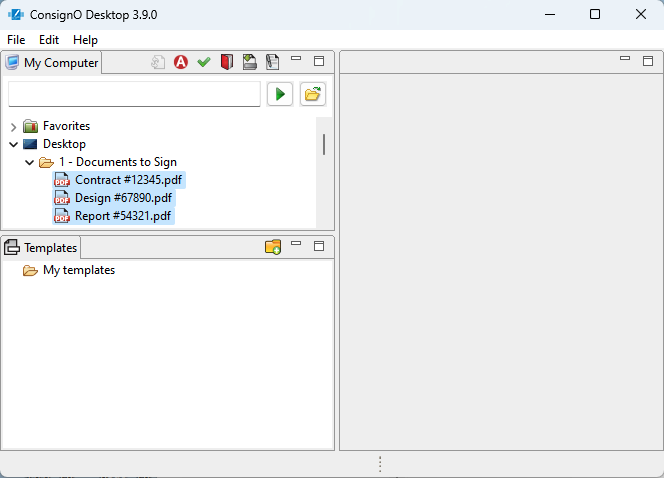
- From the My Computer view panel in ConsignO, select a folder or multiple files the same way you would do it in your file browser.
- From your desktop, select the files or folder from the folder explorer .
- Start the signing process. You can either:
- If you selected the files from ConsignO click the Sign PDF icon
 in the tool bar from the My Computer view or click Edit > Sign from the main window menu.
 - If you selected the files from your desktop, right-click and select Send to > ConsignO -6. Sign.
- If you selected the files from ConsignO click the Sign PDF icon
-
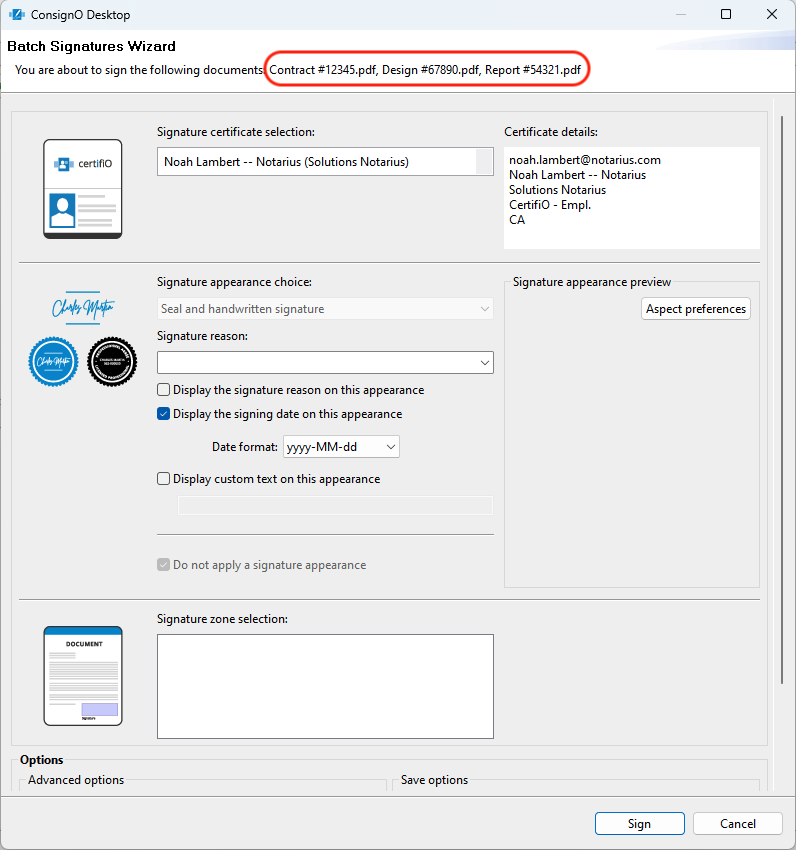
In the Batch Signatures Wizard, the documents you are about to sign are listed at the top of the window. If the list is wrong, click Cancel and start over.
-
Continue signing process as you would do for a single document signature.
Note for CertifiO Cloud users: For the moment, you will need an SMS for each digital signature that you applying.
Apply a template to multiple documents
- Select the documents you want to apply the template to. You can either:
- From the My Computer view panel in ConsignO, select a folder or multiple files the same way you would do it in your file browser.
- From your desktop, select the files or a folder from your folder explorer.
- Start applying a template. You can either:
- If you selected the files from ConsignO click the Apply template icon
 in the tool bar from the My Computer view or click Edit > Apply a template from the main window menu.
 - If you selected the files from your desktop, right-click and select Send to > ConsignO -4. Apply Template.
- If you selected the files from ConsignO click the Apply template icon
- Continue the template application process as you would do for a single document template.
Creating a Portfolio
What you should know
You can combine multiple PDF documents into one portfolio. Portfolios are similar to ZIP files and may contain both signed and unsigned documents. Each document of a portfolio can be printed separately. A portfolio may contain signed documents, but cannot itself be signed. Files in a ConsignO portfolio are ordered. The portfolio will carry a .pdf file extension, regardless which type of documents a newly created portfolio contains. Portfolios are identified by the icon in the My Computer view. Note that the files in a portfolio are ordered.
To create a portfolio
- Select your documents the same way as in batch signing.
- Start creating your portfolio. You can either:
- If you selected the files from ConsignO, right-click and select Create a portfolio or click File > Create a portfolio from the main window menu.
- If you selected the files from your desktop, right-click and select Send to > ConsignO -10. Create a portfolio.
- (Optional) In the Create a portfolio window, select a document from the list and change its order by clicking on the arrows on the right.
- Click OK.
- In the Save as dialogue window, choose the portfolio’s name and folder location.
- Click Save.
You now have your file portfolio.
To edit a portfolio
- In the My computer view, double-click on an existing portfolio.
- From the portfolio window, you can:
- Add a new document by clicking Add.
- Remove a document by selecting it and clicking Remove.
- Extract a document, similar to extracting it from a zip archive, by selecting it and clicking Extract. You are then prompted to select and extraction folder.
- Change documents order in the list using the arrows.
- Click Save to save your changes.
Merging documents
What you should know
You can merge several signed and/or unsigned documents into a single PDF (or PDF/A) document, which can then be authenticated with your digital signature. When merging signed documents, remember that the digital signatures originally present on the documents are deleted; only the Signature appearances remain in the merged document. It is necessary to authenticate the newly merged document. In other words, all signers of the original document must digitally sign the newly merged document to authenticate it.
Note that it is possible to merge only one document to remove its digital signature while keeping the Signature appearance intact. It is also possible to merge documents without signing the result by cancelling the last signature step. ConsignO will then invite you to save the unsigned document.
To merge documents
- Select your documents the same way as in batch signing.
- Start merging your documents. You can either:
- If you selected the files from ConsignO, right-click and select Merge Documents or click File > Merge Documents from the main window menu.
- If you selected the files from your desktop, right-click and select Send to > ConsignO -9. Merge…
- From the Merge documents window:
- (Optional) Change the documents order by using the arrows.
- Check Convert merged document with the following PDF/A format if you want to convert your file.
- Select which PDF/A format from the drop-down list.
- Click Finish.
You will be warned about signature zone conflicts if there are any.
- In the Save as dialogue window, choose the merged document’s name and folder location.
- Click Save.
You now have a new merged document ready to be signed.
8 - Combined Actions
Combined Actions
What you should know
Having to perform multiple steps on a document can be inefficient. ConsignO provides the ability to launch a PDF/A conversion, apply a template and sign documents in a single step using the Combined Actions option. This option can be accessed by right-clicking in the file explorer or in the My Computer view in ConsignO Desktop. Combined actions can be applied to one or multiple PDF documents.
To perform combined actions:
- Select the documents you want to modify. You can either:
- From the My Computer view panel in ConsignO, select a folder or multiple files the same way you would do it in your file browser.
- From your desktop, select the files or a folder in your Windows Explorer.
- Start the file modification process. You can either:
- If you selected the files from ConsignO, right-click and select Combined Actions from the menu or click Edit > Combined Actions from the main window menu.
- If you selected the files from your desktop, right-click and select Send to > ConsignO -1. Combined Actions.
- From the Combined Actions Wizard you can:
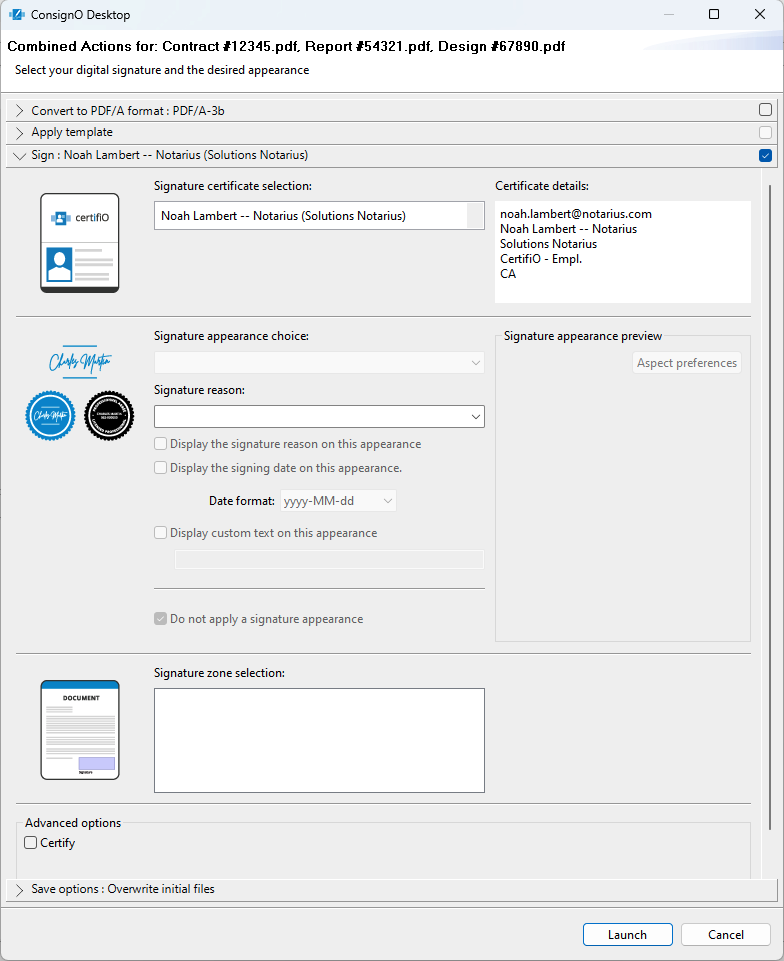 Convert the file to a PDF/A format.
-
- Select the checkbox to the right if you want this action performed on the file.
- Click on the bar with the greater than (>) symbol to select which format to convert into.
- Apply a template
- Select the checkbox to the right if you want this action performed on the file
- Click on the bar with the greater than (>) symbol to change the applied template. The template chosen in Preferences is applied by default.
- Sign the document
- Select the checkbox to the right if you want this action performed on the file.
- Click on the bar with the greater than (>) symbol to change the signature options as you would Sign a document only.
- Modify the Save Options
- Click on the bar with the greater than (>) symbol to change the save options. The options configured in Preferences are applied by default.
-
- Click Lauch
NOTE: If an action cannot be accomplished, the checkbox stays greyed out and a message explains the reason.
9- Printing
Printing documents with Adobe Reader from ConsignO Desktop
What you should know
ConsignO Desktop can print using Adobe Acrobat Reader (default option), or by using its embedded printing functions. Printing using Adobe Acrobat Reader offers advanced printing options, and ConsignO will merge the selected documents beforehand if you select to print multiple documents in a single operation. Note that ConsignO does not integrate with the Standard and Pro versions of Adobe Acrobat.
To print documents:
- Select one or more documents to print from the My Computer view.
- Either right-click or click on the File
- Select Print with Adobe Reader.
- If you selected to print multiple documents with Adobe Reader, a pop-up window appears.
- Reorder your documents with the arrows on the right side if necessary
- Select if you want to convert the merged document into a PDF/A format.
- Click Finish.
- The print setup window appears. Configure your print options as usual.
10 - Annex
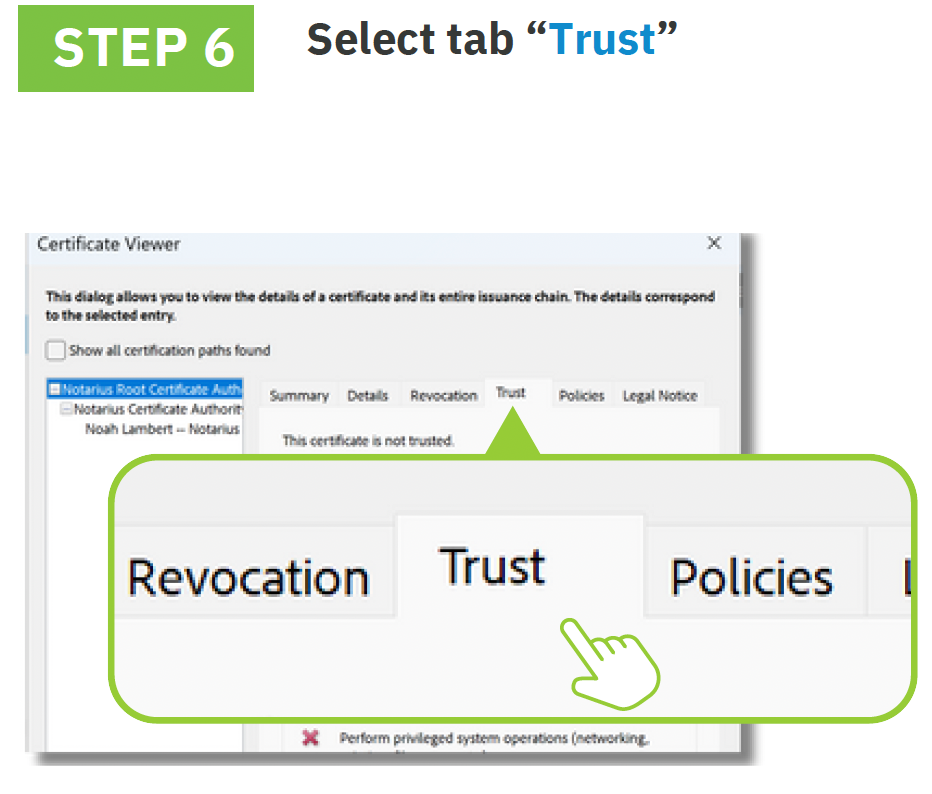
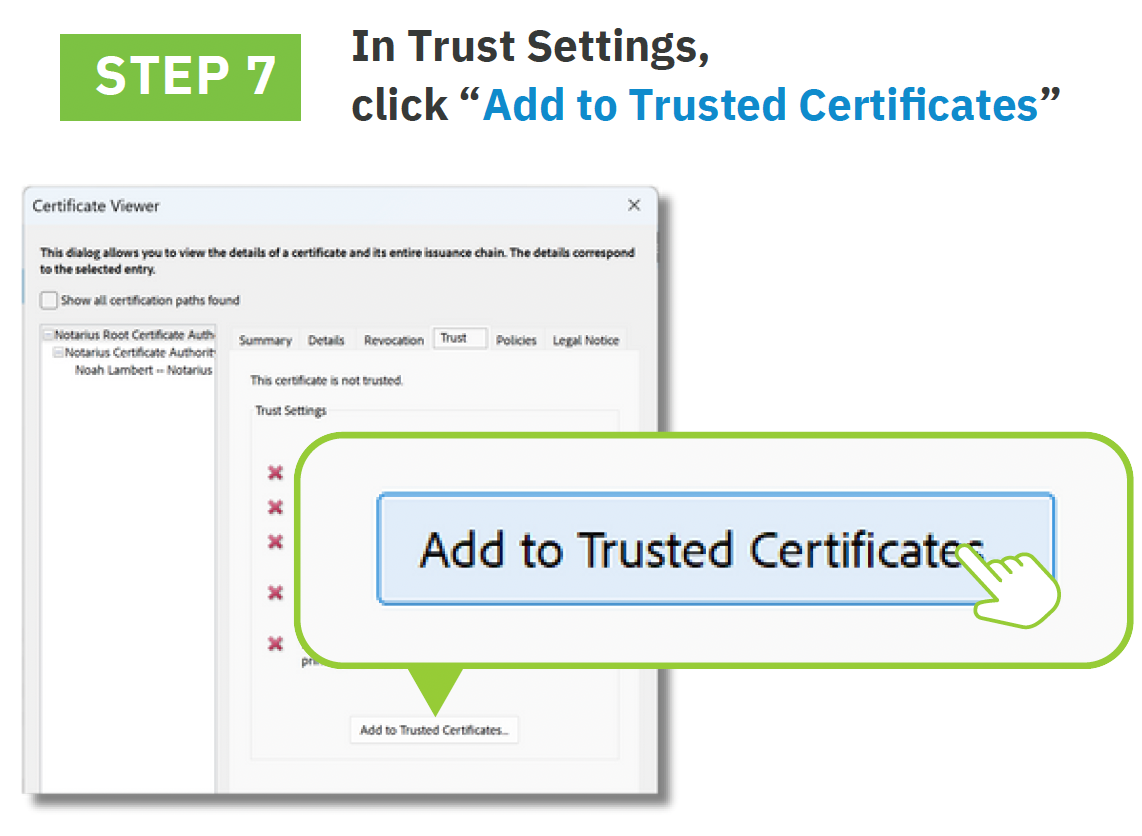
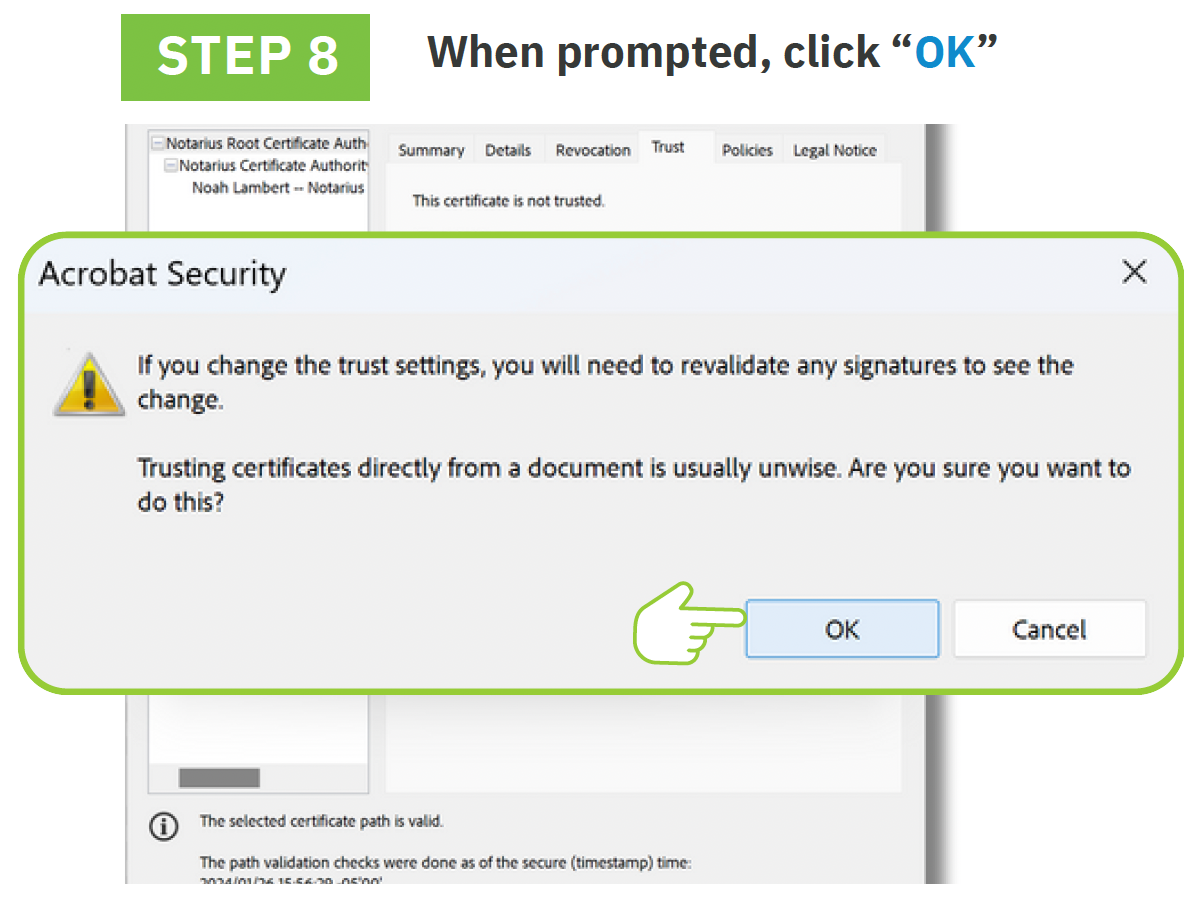
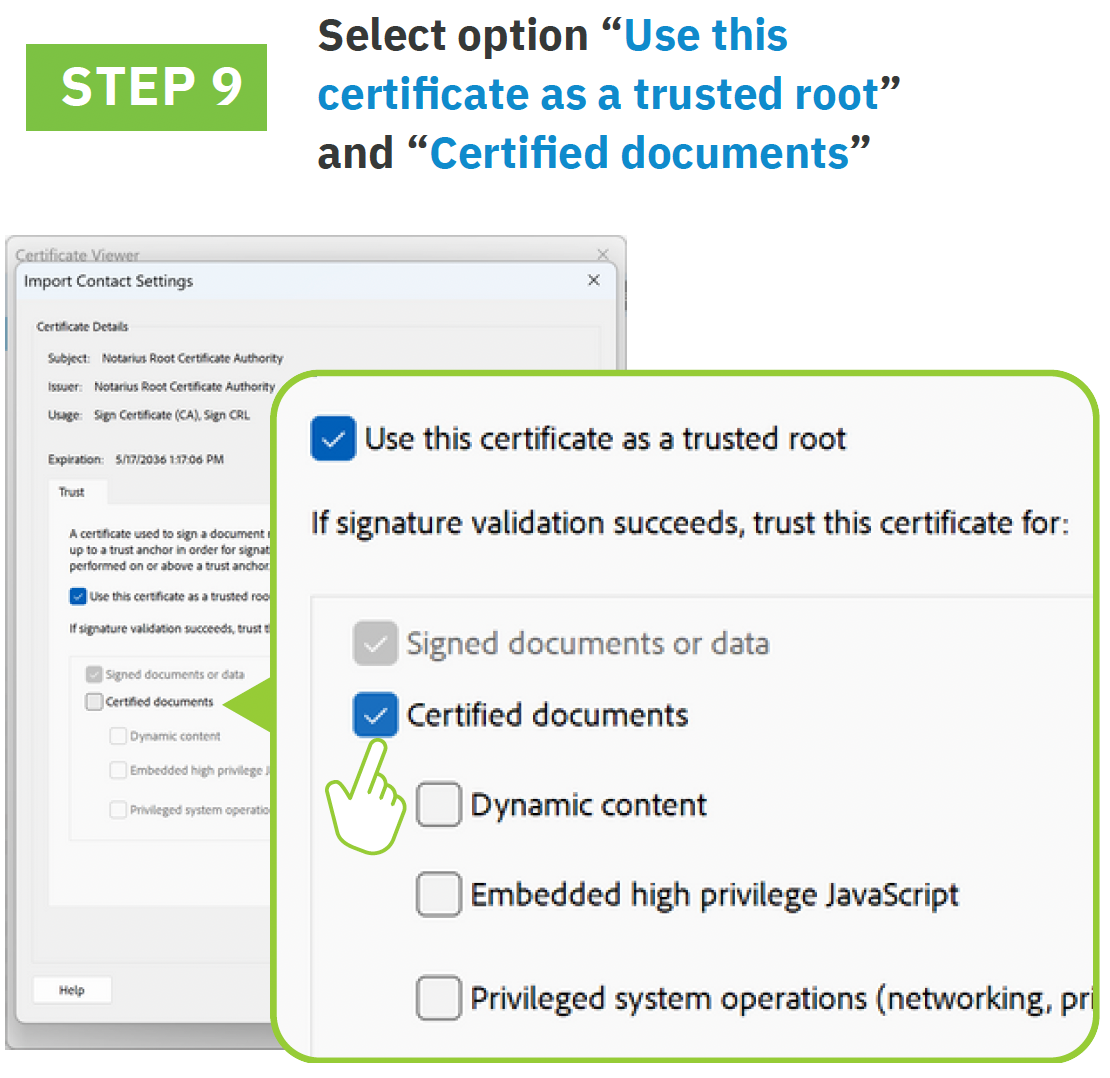
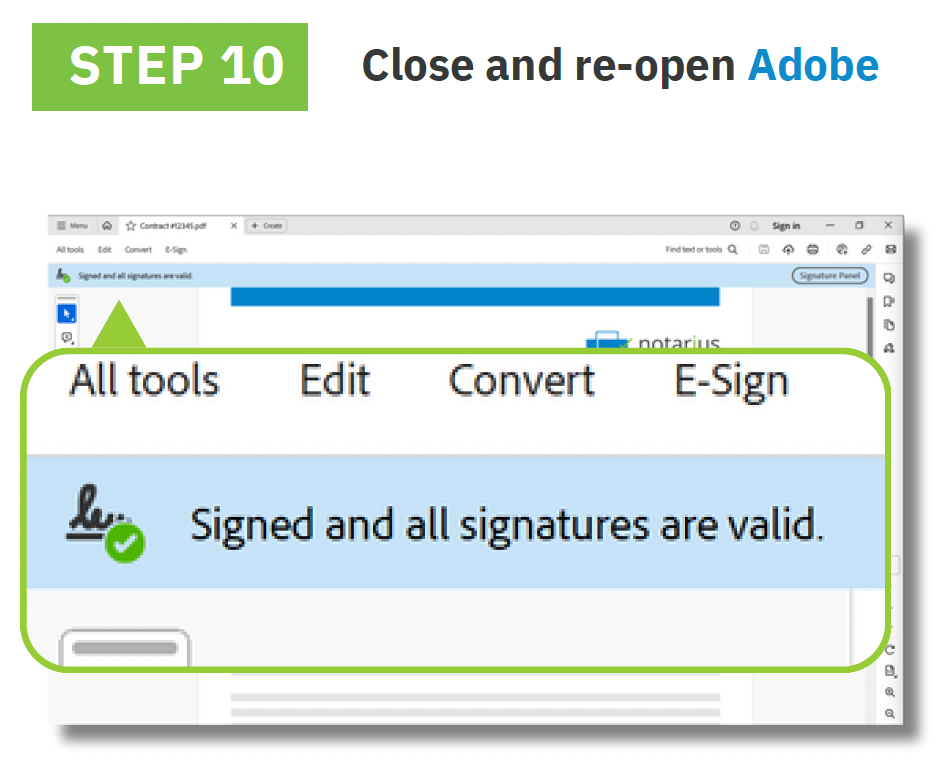
How to configure Adobe Acrobat to validate signatures
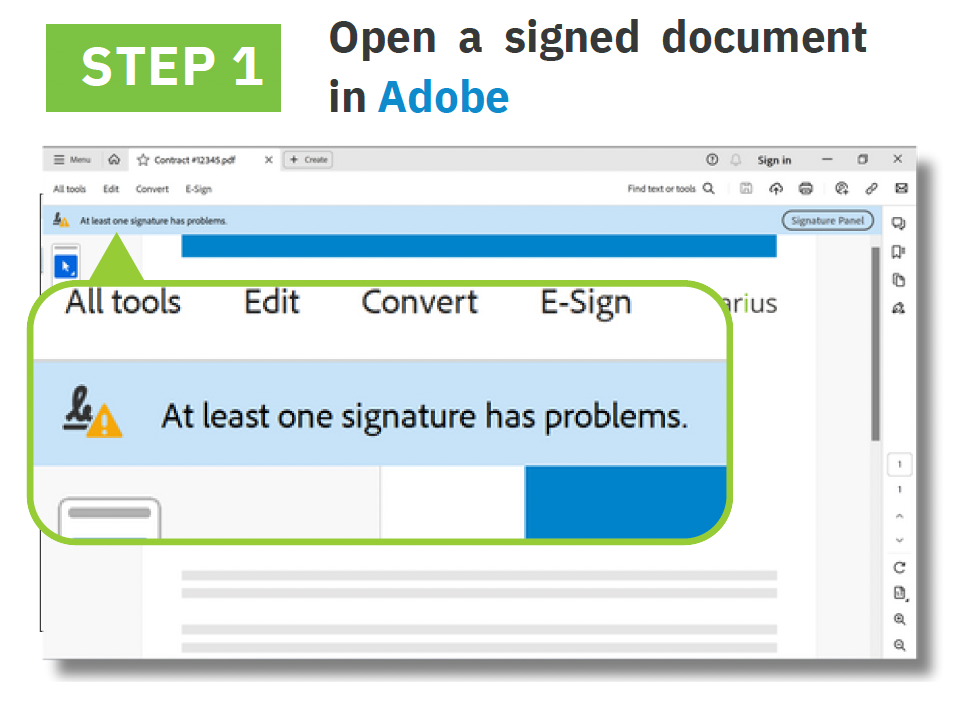
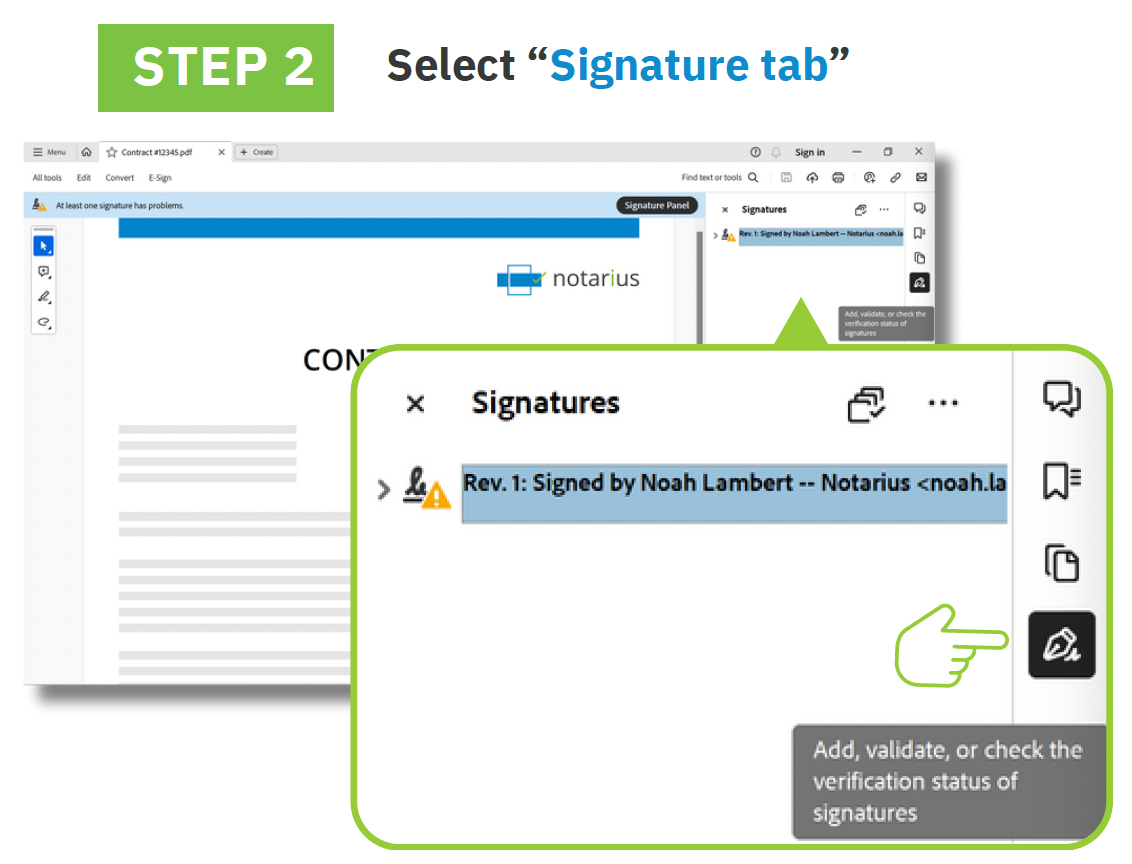
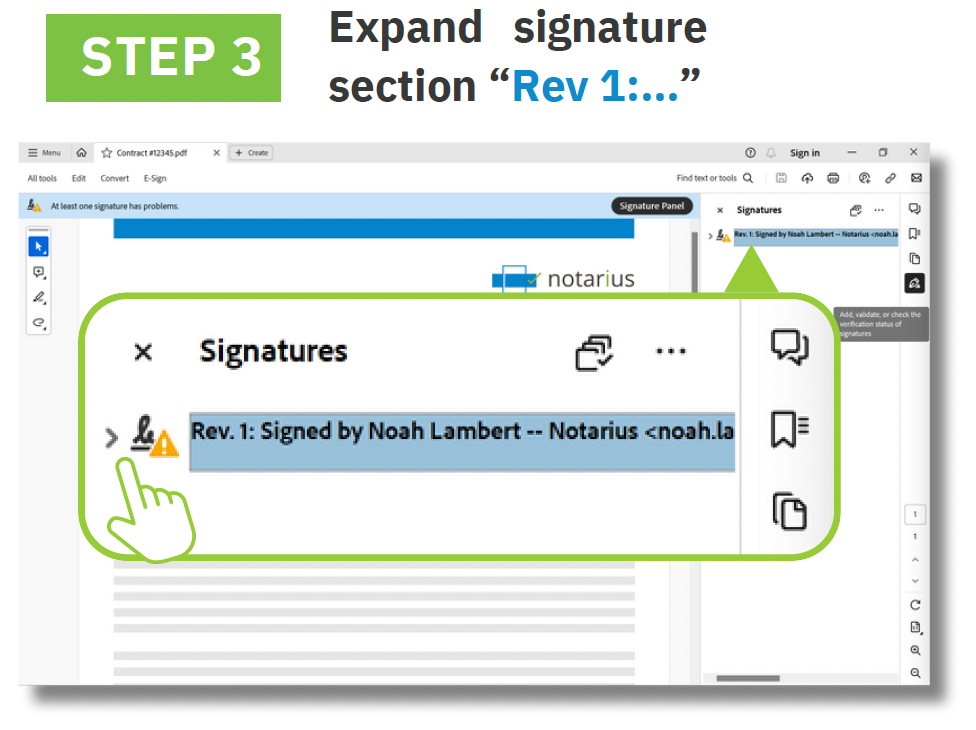
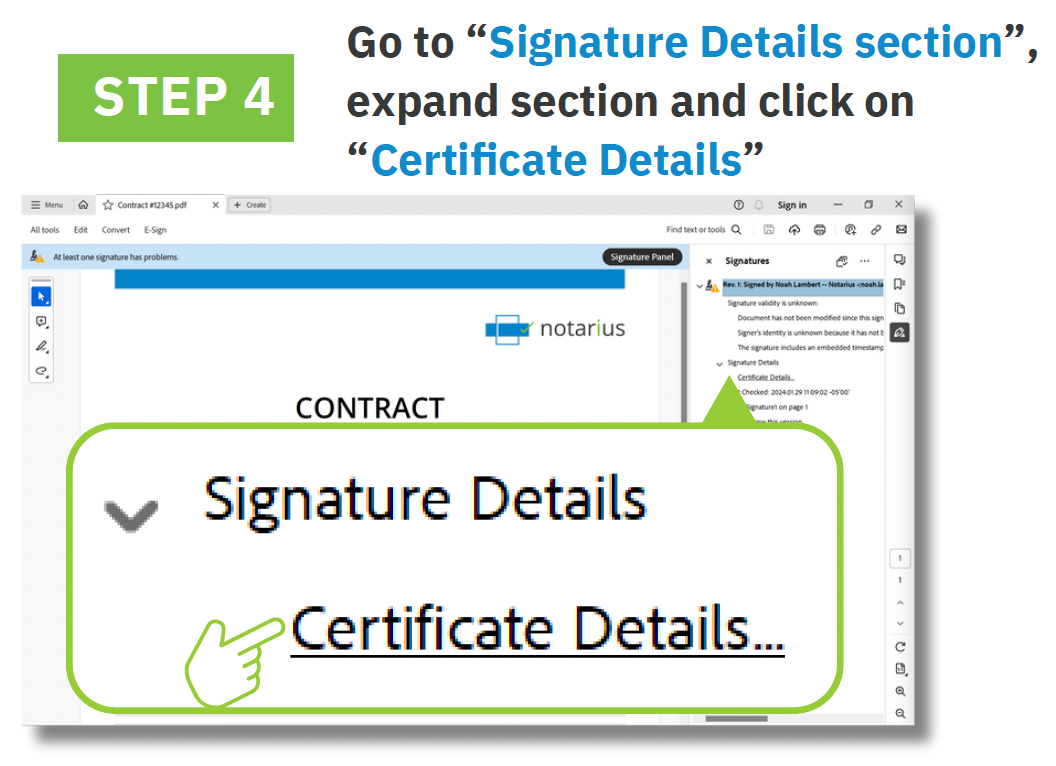
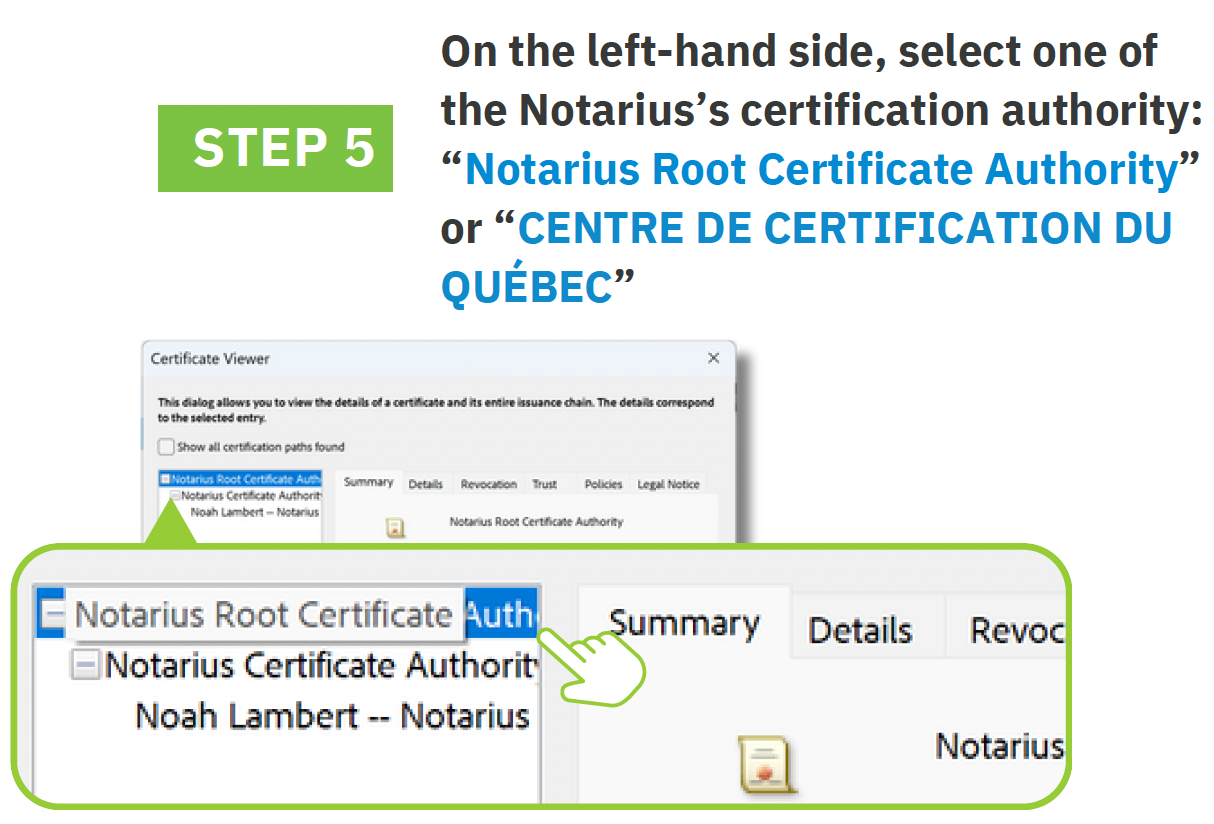
Depending on your Professional Association, your Certificate Authority might be Centre de Certification du Québec, AC1 or Notarius Root Certificate Authority

PDF version available here : How to configure Adobe Acrobat to validate signatures